Tools & Accessories
Chapter 8 · Unattended Surveillance Site Design Guide
Successful installation and commissioning of unattended surveillance sites requires a comprehensive set of tools and consumable accessories. Unlike attended installations where additional materials can be quickly sourced, remote site installations often require a single visit to complete all work. Missing a critical tool or accessory can mean a wasted trip and project delay. This chapter provides a complete accessories and tools checklist, organized by category, for a standard unattended site installation.
8.1 Installation Accessories & Tools Checklist
The checklist image below provides a visual overview of the twelve essential accessory and tool categories required for a standard unattended surveillance site installation. Each item is shown with its specification and quantity guidance. The detailed Bill of Accessories (BoA) table in Section 8.2 provides the complete specification for procurement.
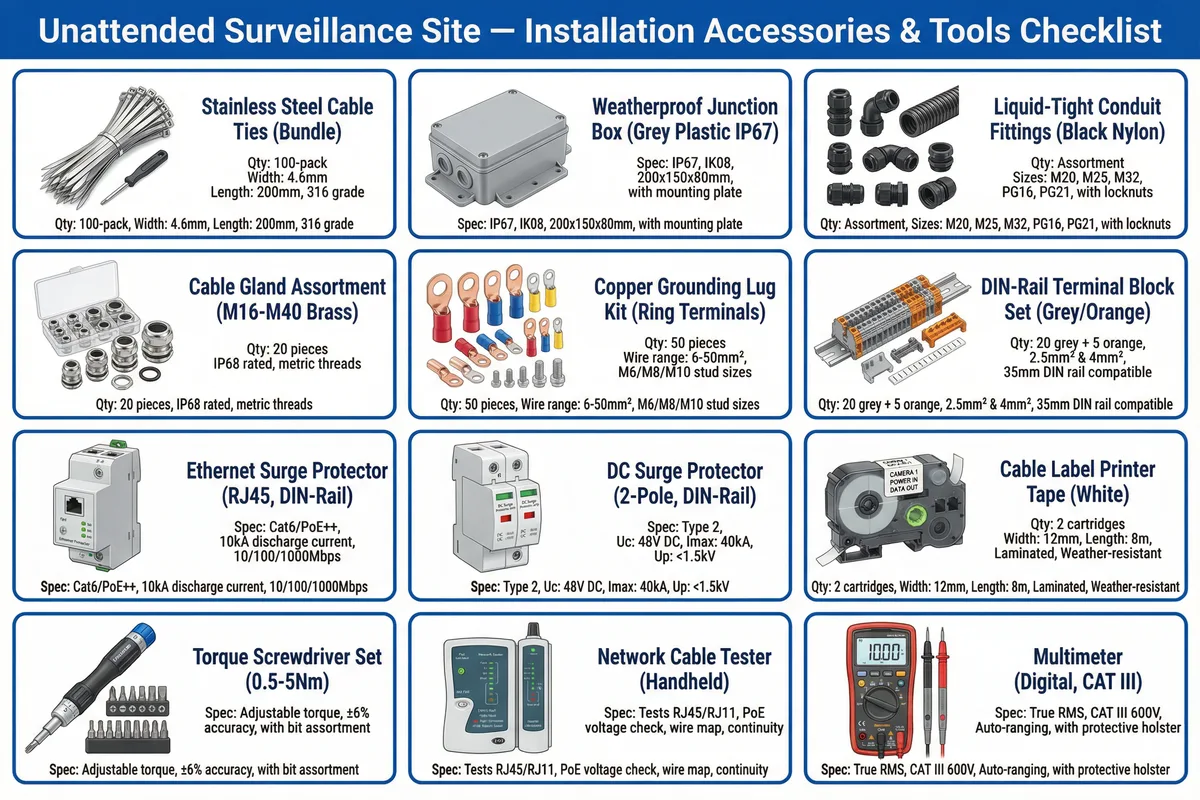
Figure 8.1: Installation accessories and tools checklist — 12 essential categories: stainless steel cable ties, weatherproof junction boxes, liquid-tight conduit fittings, cable gland assortment, copper grounding lug kit, DIN-rail terminal blocks, Ethernet surge protectors, DC surge protectors, cable label printer tape, torque screwdriver set, network cable tester, and digital multimeter
8.2 Complete Bill of Accessories (BoA)
The table below provides the complete specification for all accessories and consumables required for a standard 4–8 camera unattended site installation. Quantities are per-site estimates and must be adjusted based on the actual site survey and cable routing plan.
| Category | Item | Specification | Qty / Site | Notes |
|---|---|---|---|---|
| Electrical | AC Surge Protector (SPD) | Type 1+2, Uc ≥275V, Imax ≥40kA, DIN-rail, remote fault indicator | 1 | Install at AC mains entry; bond to grounding bar with ≤0.5m conductor |
| Electrical | DC Surge Protector | 2-pole, Uc ≥60V DC, Imax ≥40kA, DIN-rail | 1–2 | One for solar input; one for battery output if separate circuit |
| Network | Ethernet Surge Protector (RJ45) | Cat6/PoE++, 10kA discharge, 1Gbps, DIN-rail, in-line transparent | 4–8 | One per external camera cable entry to cabinet |
| Electrical | DIN-Rail Terminal Block Set | 2.5mm² and 4mm², grey/orange, 35mm DIN-rail compatible, screw clamp | 20–40 pcs | For all field cable terminations; label each terminal |
| Electrical | Copper Grounding Lug Kit | Ring terminals, 6–50mm², M6/M8/M10 stud sizes, tinned copper | 50 pcs | For all bonding conductors; crimp with calibrated tool; no solder |
| Mechanical | Cable Gland Assortment | M16–M40, brass or nylon, IP68 rated, metric threads, with locknut | 20 pcs | Size to cable OD; tighten to IP68 torque specification |
| Mechanical | Liquid-Tight Conduit Fittings | M20, M25, M32, PG16, PG21, black nylon, with locknut | Assorted | For conduit entries to junction boxes and cabinet; maintain IP rating |
| Mechanical | Stainless Steel Cable Ties | 316 grade, 4.6mm width, 200mm length, 100-pack | 100 pcs | For outdoor cable bundling; UV and corrosion resistant; use cable tie gun |
| Mechanical | Weatherproof Junction Box | IP67, IK08, 200×150×80mm, with mounting plate, grey polycarbonate | 2–4 | For field cable splice points; label with circuit ID; seal all entries |
| Mechanical | Self-Amalgamating Tape | 25mm width, 3m roll, black, UV-resistant, -40°C to +90°C | 5 rolls | For sealing all coaxial connectors and cable entries; stretch 50% on application |
| Network | Cable Label Printer Tape | 12mm width, 8m length, white, laminated, weather-resistant | 2 cartridges | Label all cables at both ends; label all fuses, terminals, and components |
| Mechanical | Silica Gel Desiccant | Indicating type (blue to pink), 50g sachets, rechargeable | 4 sachets | Place in cabinet; replace or recharge when fully saturated (pink color) |
| Test | Network Cable Tester | Tests RJ45/RJ11, PoE voltage check, wire map, continuity, tone generator | 1 | Test every cable before and after installation; document results |
| Test | Digital Multimeter | True RMS, CAT III 600V, auto-ranging, temperature probe, with protective holster | 1 | For voltage, current, resistance, and continuity measurements; CAT III minimum for AC work |
| Test | Ground Resistance Tester | 3-terminal or clamp type, measurement range 0.01–2000Ω, CAT III | 1 (shared) | Measure ground resistance before energizing; document result in commissioning report |
| Test | Torque Screwdriver Set | Adjustable 0.5–5Nm, ±6% accuracy, with bit assortment (PH, PZ, TX, SL) | 1 | Use for all terminal block and connector torque specifications; prevents over/under-torque |
| Safety | Insulated Gloves (Electrical) | Class 00 (500V AC), EN 60903, with leather protector gloves | 1 pair | Mandatory for all AC electrical work; inspect before each use; replace if damaged |
| Safety | Lockout/Tagout Kit | Padlock, hasp, tags, MCB lockout device; OSHA/IEC compliant | 1 | Lock out all energy sources before working on electrical components; mandatory safety procedure |
8.3 Recommended Spare Parts Kit
Every unattended site should have a site-specific spare parts kit stored in the cabinet or at the nearest accessible location. The kit enables rapid first-response repair without waiting for parts delivery, minimizing downtime for critical sites.
| Spare Part | Quantity | Rationale |
|---|---|---|
| Fuse set (all ratings used on site) | 3× each rating | Most common failure; enables immediate restoration without site visit |
| Ethernet SPD (RJ45) | 2 | Lightning surge damage; most common electronic failure at remote sites |
| Cable glands (most common size) | 5 | Damaged during installation or maintenance; IP rating depends on correct gland |
| SIM card (pre-activated, backup carrier) | 1 | Enables immediate failover if primary SIM is deactivated or damaged |
| Silica gel desiccant sachets | 4 | Replacement for saturated sachets; prevents condensation damage |
| Self-amalgamating tape | 1 roll | Emergency weatherproofing repair for cable entries or connectors |
| Patch cable (Cat6, 1m, pre-made) | 2 | Replaces damaged cabinet patch cables without crimping tools on-site |
Remote Site Preparation: For sites more than 2 hours from the nearest supplier, carry a complete spare parts kit on every site visit. The cost of a wasted trip due to a missing fuse or cable gland far exceeds the cost of carrying spare parts. Document the spare parts inventory in the site logbook and replenish after each use.